


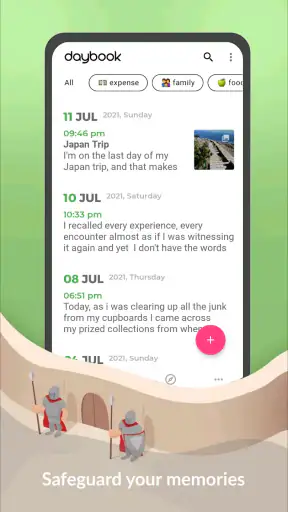
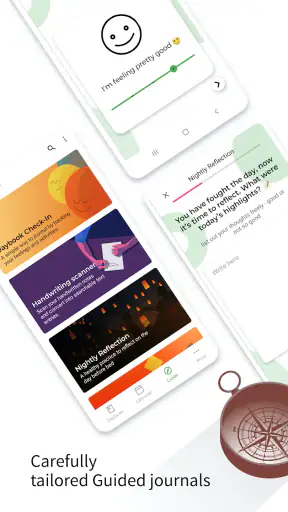


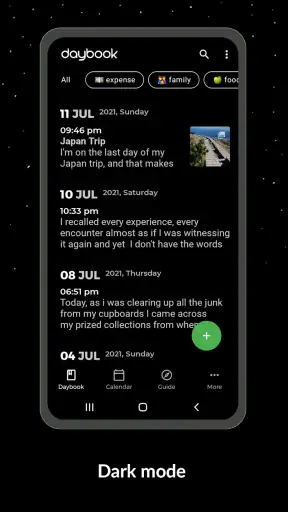

I like diary apps that get out of the way, and Daybook - Diary, Journal, Note is built around that idea. It is a lifestyle app from Daybook Labs Inc that lets me capture thoughts by typing or speaking instead of turning journaling into another complicated project. After using it as a place for quick memories, longer reflections, and ordinary daily notes, I found its biggest strength is how little effort it asks for at the moment when I actually want to write.
That simplicity also creates a few points of friction. A voice-first journal depends on clear input and a sensible review habit, while a private archive is only useful if I can reliably find and revisit what I saved. Daybook works best when I treat it as a lightweight personal record rather than a full task manager, social network, or deeply customizable writing system. Its real appeal is reducing the distance between remembering something and recording it.
Getting past the first points of friction
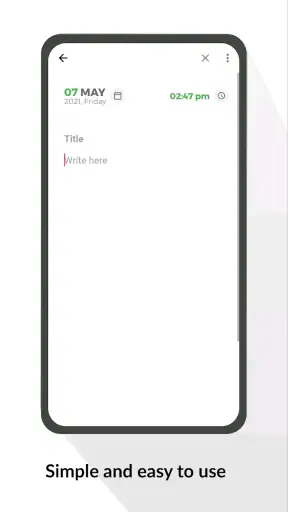
The first place I would expect a new user to hesitate is the blank journal itself. Traditional notebooks make the next step obvious: pick up a pen and write. Digital journals often present buttons, templates, moods, calendars, or prompts before the user has formed a habit. Daybook feels more approachable because the central action is simply creating an entry, but that does not remove the need to decide what belongs in the journal.
I found it easier to begin with small, specific observations instead of trying to produce a polished page. A sentence about an unexpectedly good conversation, a voice note about an idea during a walk, or a short record of a family moment gives the app a useful purpose immediately. This matters because a journal that feels like homework is easy to abandon. Daybook is particularly well suited to low-pressure memory keeping, where a few honest lines are more valuable than a carefully structured essay.
Voice entry is one of the most practical parts of the experience. Speaking can be faster than typing when I am tired, driving is not appropriate, or a thought arrives while my hands are busy with something else. I still review dictated text rather than assuming it is perfect. Names, unusual words, background noise, and changes in pace can all make a spoken entry less accurate or less readable. The useful habit is to speak in short phrases, pause naturally, and check the result before moving on.
If a spoken entry does not appear as expected, I would first repeat the action in a quiet place and use a short test sentence. That separates an input problem from a problem with the journal itself. I would also make sure the app is current, since the installed version is 6.38.0 and updates can affect compatibility or behavior. These are simple checks, but they prevent a user from rewriting a long memory before discovering that the original issue was only unclear speech.
Another common sticking point is expecting the app to behave like a conventional notes tool. Daybook is better when the entry represents a moment, thought, or reflection rather than a growing collection of shopping lists and project fragments. I can use it for those things, but mixing every kind of note into one personal timeline may make later browsing less satisfying. For work tasks, collaborative lists, or documents that need formatting, a dedicated notes or productivity app remains the better choice.
The developer, Daybook Labs Inc, has kept the product focused enough that I do not feel pushed into designing a complicated system before I can start. That is helpful for someone who wants a private daily record but less appealing for a person who enjoys building elaborate categories and writing environments. The right question is not whether it has every journaling feature imaginable; it is whether its direct approach matches the way I want to remember things.
Checks that make setup less frustrating
Before making Daybook part of a daily routine, I would test the two main ways I expect to use it: a short typed entry and a brief spoken entry. This takes little time and immediately shows whether the writing flow feels natural on my phone. If typing is comfortable but speaking is not, I can still use the app as a conventional journal rather than forcing myself into voice capture.
I would also decide on a realistic entry rhythm. A daily journal does not have to mean a long page every night. I prefer a tiny minimum, such as recording one event, one feeling, or one detail worth remembering. On days when I have more to say, I can continue. This approach gives the app a dependable role without making missed days feel like failure.
Because the app is free to install, it is easy to try without committing money at the start. It does include optional in-app purchases ranging from $1.99 to $199.99 per item, so I would pay attention to the purchase screen and only choose an upgrade if the added value fits my needs. The free starting point is useful for testing the writing experience first. I would not buy anything simply because I felt pressured to complete setup.
The age rating is Everyone, which makes the app broadly approachable as a personal writing space. That does not mean every entry is suitable to share with another person. A diary can contain sensitive memories, personal names, or private plans, so I would still use ordinary phone-safety habits: keep the device protected, avoid dictating confidential material in public, and think carefully before displaying an entry where others can read it.
Daybook supports Android devices running version 6.0 or later, which gives it a wide reach among Android users. Compatibility is still worth checking on the particular phone being used, especially if the device is old or heavily customized. If the app behaves oddly, I would restart it, restart the phone, install any available update, and test a very small entry before attempting a large import or a long recording.
One setup decision that pays off later is choosing what “finished” means for an entry. For me, a voice capture is not complete until I have glanced over the text and corrected anything important. A quick note is complete once it contains enough context to make sense later. Defining that boundary keeps the journal from filling with fragments that seemed obvious at the time but become mysterious weeks afterward.
Recovering a routine when an entry goes wrong
When a journal entry fails, the temptation is to stop using the app for the day. I think a better recovery method is to preserve the thought first and troubleshoot second. If voice capture is unreliable, I would type a short summary immediately. If the app closes or an entry looks incomplete, I would recreate the essential facts in a new note rather than spending too long trying to reconstruct every original sentence.
This is especially important for emotional or time-sensitive writing. The value of a journal is often in the moment, not in perfect wording. A rough sentence such as “I felt relieved after the call because the issue was finally understood” can preserve the memory even if the original dictation was lost. I would rather have that honest summary than abandon the entry while chasing a technical explanation.
A useful recovery workflow is to keep entries small when testing. I would create a short title or opening sentence, save it, and then add more detail. That makes it easier to identify whether the difficulty happens during creation, speech conversion, saving, or later viewing. It also limits the amount of writing at risk if the app or phone becomes unstable.
If a saved memory is difficult to locate, I would first search using the simplest distinctive word I remember from it rather than a full sentence. Personal writing often contains several possible descriptions for the same event, and a short keyword gives me more chances of finding the right place. I would also avoid creating a new entry every time I merely want to continue the same thought. Keeping one event together makes later reading more coherent.
For longer reflections, I prefer a two-stage process. I capture the main idea quickly, then return later to add context while the event is still fresh. This is one of the less obvious ways to use a voice journal: dictation becomes an inbox for memories, while editing turns those fragments into something I will actually enjoy reading. It avoids the false choice between writing a perfect entry immediately and writing nothing.
Daybook’s strongest workflow is therefore not just “speak and forget.” It is capture, check, and occasionally revisit. That extra review step improves accuracy and makes the archive more meaningful. It also reveals a limitation: users who want an entirely automatic record may find this process more hands-on than expected.
When the app is not the cause
Not every failed journal session is a Daybook problem. Voice recognition can be affected by room noise, a weak microphone, speaking too quickly, or trying to dictate while several people are talking. A connection issue or a phone under heavy load can also make an app feel slow. I would test the same action again in a quiet environment before deciding that the journal is unreliable.
Storage and device condition can matter as well. A phone with very little free space, an outdated operating system, or aggressive background restrictions may create behavior that appears to come from one app. Restarting the device and checking its general health are sensible steps. If other apps are also freezing or failing to save changes, the wider phone environment deserves attention before Daybook is blamed.
There is also a human cause that is easy to overlook: an entry may feel unsuccessful because the prompt is too broad. “How was my day?” can be harder to answer than “What surprised me today?” or “What do I want to remember about this evening?” I get more from the app when I give myself a narrow starting point. This is not a missing feature; it is a better match between the tool and the way memory works.
Privacy expectations should be considered realistically. A personal journal feels intimate, but I would not treat any phone app as a substitute for thinking about device access, account security, or what I choose to record. For extremely sensitive material, a different solution may be preferable if it offers the specific security controls I require. Daybook is a convenient personal journal, but convenience should not replace sensible judgment about private information.
The same distinction applies to organization. If I need complex folders, advanced formatting, shared editing, or a formal knowledge base, a specialized notes platform may serve me better. Daybook’s focused design is an advantage for quick memories, yet that focus can feel restrictive when a journal entry turns into a research project or a multi-part plan. I would use it alongside another tool rather than forcing it to manage every kind of information.
Who will get the most from this journal?
I would recommend Daybook to someone who wants to remember ordinary life without maintaining a demanding writing system. It suits people who think more clearly by speaking, users who want to capture memories before they disappear, and anyone who has tried paper journaling but struggled with consistency. It is also a good fit for short evening check-ins, travel memories, personal milestones, and reflections that are too meaningful for a fleeting message but too small for a full document.
A realistic example is a busy parent returning home after a long day. Instead of waiting for a quiet hour that may never arrive, they can record a brief account of a child’s funny comment, a difficult moment that was handled well, or a detail from dinner. Later, they can correct the wording and add one sentence about why the moment mattered. That workflow respects limited time while preserving a memory that might otherwise vanish.
I would be more cautious recommending it to someone who wants a highly designed writing environment. If custom layouts, extensive tagging, collaborative access, or detailed project organization are essential, a conventional notes app may be the more comfortable choice. Likewise, a person who dislikes speaking to a phone will not gain much from the voice-centered approach, even though typed journaling remains possible.
The app has established a substantial audience, with an average rating of 4.6 from around 59 thousand ratings and more than a million installs. Those figures suggest that the straightforward concept resonates with many Android users, but they do not decide whether it suits an individual routine. I would judge it by the speed of creating an entry, the comfort of reviewing it, and whether I genuinely return to the journal after the first week.
My practical verdict after using it
Daybook - Diary, Journal, Note succeeds because it treats journaling as something that should fit around life rather than demand a special ceremony. I appreciate the option to speak a memory, the uncluttered path to a new entry, and the way short notes can accumulate into a personal record. The app is free to begin with, rated for Everyone, and has been available since Jan 1, 2017, giving it a long-running place in the lifestyle category.
My recommendation comes with a clear condition: use it as a capture-and-reflect tool, not as an all-purpose information system. Check dictated entries, keep early tests short, and recover quickly with a typed summary if something goes wrong. If the phone itself is unstable, address that first. If your needs center on advanced organization or specialized privacy controls, compare other options before settling in.
The best reason to try it is practical rather than flashy. When a memory appears at an inconvenient time, Daybook gives me a quick place to put it. When I return later, I can turn that rough capture into a meaningful entry. I recommend it to anyone who values consistency and immediacy more than elaborate journal customization. For that audience, it is a friendly, useful companion; for everyone else, its focused simplicity is exactly the quality that may determine whether it feels helpful or limited.
In my experience, the app is worth testing with a handful of real moments instead of judging it from the first blank screen. Record something short, try speaking once, review what was saved, and see whether the process feels natural on your device. If it does, Daybook can become a gentle daily habit rather than another abandoned download.


